welcome to my page

Monday, 25 July 2016

Andoride Mobile Phones Codes With Name

Secret Hack codes are those codes which are usually hidden from users for any misuse and exploit. As we all know android is very new platform and thus very few hack codes of androids are there on internet. Today i am sharing all the hack codes of androids cellphones that i know. And i surely hope you can’t find codes better than that. So friends let’s hack and explore our android Phones. I have tested these codes on my Phone Samsung Galaxy having an Android OS version 2.2. I am sure these will work on all previous versions.


1. Complete Information About your Phone 

*#*#4636#*#*
This code can be used to get some interesting information about your phone and battery. It shows following 4 menus on screen:
  • Phone information
  • Battery information ( How to maximize or boost Battery life in android phones)
  • Battery history
  • Usage statistics

2. Factory data reset

*#*#7780#*#*
This code can be used for a factory data reset. It’ll remove following things:
  • Google account settings stored in your phone
  • System and application data and settings
  • Downloaded applications
It’ll NOT remove:
  • Current system software and bundled application
  • SD card files e.g. photos, music files, etc.
Note: Once you give this code, you get a prompt screen asking you to click on “Reset phone” button. So you get a chance to cancel your operation.

3. Format Android Phone

  *2767*3855#
Think before you give this code. This code is used for factory format. It’ll remove all files and settings including the internal memory storage. It’ll also reinstall the phone firmware.
Note: Once you give this code, there is no way to cancel the operation unless you remove the battery from the phone. So think twice before giving this code.

4. Phone Camera Update

*#*#34971539#*#*
This code is used to get information about phone camera. It shows following 4 menus:
  • Update camera firmware in image (Don’t try this option)
  • Update camera firmware in SD card
  • Get camera firmware version
  • Get firmware update count
WARNING: Never use the first option otherwise your phone camera will stop working and you’ll need to take your phone to service center to reinstall camera firmware.

5. End Call/Power

 
*#*#7594#*#*
This one is my favorite one. This code can be used to change the “End Call / Power” button action in your phone. Be default, if you long press the button, it shows a screen asking you to select any option from Silent mode, AirPlane mode and Power off.
You can change this action using this code. You can enable direct power off on this button so you don’t need to waste your time in selecting the option.

6. File Copy for Creating Backup

*#*#273283*255*663282*#*#*
This code opens a File copy screen where you can backup your media files e.g. Images, Sound, Video and Voice memo.

7.  Service Mode

*#*#197328640#*#*
This code can be used to enter into Service mode. You can run various tests and change settings in the service mode.

8. WLAN, GPS and Bluetooth Secret Hack Codes for Android:

*#*#232339#*#* OR *#*#526#*#* OR *#*#528#*#*           – WLAN test (Use “Menu” button to start various tests)
*#*#232338#*#*                  – Shows WiFi
*#*#1472365#*#*                – GPS test
*#*#1575#*#*                      – Another GPS test
*#*#232331#*#*                  – Bluetooth test
*#*#232337#*#                    – Shows Bluetooth device address

9. Codes to get Firmware version information:

*#*#4986*2650468#*#* – PDA, Phone, H/W, RFCallDate
*#*#1234#*#* – PDA and Phone
*#*#1111#*#* – FTA SW Version
*#*#2222#*#* – FTA HW Version
*#*#44336#*#* – PDA, Phone, CSC, Build Time, Changelist number

10. Codes to launch various Factory Tests:

*#*#0283#*#* – Packet Loopback
*#*#0*#*#* – LCD test
*#*#0673#*#* OR *#*#0289#*#* – Melody test
*#*#0842#*#* – Device test (Vibration test and BackLight test)
*#*#2663#*#* – Touch screen version
*#*#2664#*#* – Touch screen test
*#*#0588#*#* – Proximity sensor test
*#*#3264#*#* – RAM version

Wednesday, 18 May 2016

How To Download Complete Websites to Browse Offline


#1 Using HTTrack

The method to download any website for offline use is very easy and the software named Httracks is perfect for this work. By which you can store any websites in your drives permanently to access them in future. Follow the below steps to proceed.
Step 1. First of all download and install the software Httracks from here.

Step 2. Now launch the software and it will ask you to enter the project name, project category and the default path to save the websites you download.

Step 3. Enter the details and just click on next, Now in the text box you have toenter the URL of the site which you want to download, just paste the complete URL of the site and click on next.

Step 4. Now the downloading process will begin and this can take time according to your internet speed and size of the website you are downloading.

Now after download process is complete, just browse to the saved path and there you will find your website file that will browse the whole website offline.


#2 Using GetLeft

Getleft is a Web site grabber, it downloads complete websites according to the options set by the user. The process of using GetLeft is very easy. So let’s know how to use GetLeft

Step 2. Now you will be asked to select the files that you want to be downloaded.

Step 3. Now wait for few minutes until the files being pulled to your system.

That’s it now you can browse your saved website in offline mode.

Monday, 25 April 2016

Update Facebook Status Only to Specific People

How to Update Your Facebook Status Only to Specific People


The method is quite simple and straight and you just need is to follow some simple trick of making close friends group, for whom you can post a status. And other friends can’t see that. So follow up the steps below to proceed.

Steps To Update Your Facebook Status Only to Specific People:

1. First of all you need to login into your Facebook account from which you want to share a status for particular people.
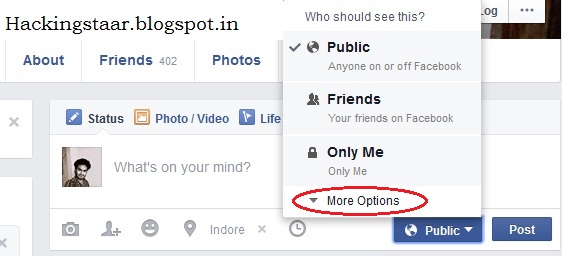
2. Now write the status and then you will see the Public under it and you just need is to click on it.

 Fb 1


3. Now you need to select the More option there.


4. Now you need to select the custom option there.
5. Now you will see two section, one to whom you want to share the post and the other to whom you don’t want to show that post and now you can add the type or the group of the people that you want to exclude from the post that you want to share.


Fb 2
6. After setting this up you need to save the changes.
7. Now a popup message will appear that will help you to understand the changes that you  had made.Fb 3
8. Thats it you are done, now your status will only get displayed to any of the particular people only.


 Note If you want to Know about it more then contact me or comment here
Or click Here


Windows Activator By satish jha

Windows 7 Loader v2.2.2:


Windows 7 Loader Activator v2.2.2 Full Windows 7 Activation is very helpful activator use to Activate Windows 7 All versions including Professional Edition, Ultimate Edition, Enterprise, Home Edition, Starter, and Basic Edition.

Windows 7 Activator by daz v2.2.2 can also Activates Windows Vista / 2008 – RTM / and Microsoft Office 2010. All Versions and editions of WIndows and Office are compatible.
New Features of Windows 7 Loader by daz v2.2.2:
  • Windows 7 daz loader is Safe to use for installation.
  • This loader can Activate all versions of windows 7.
  • This is also called Trial Resetter of windows 7 all editions.
You will be aware about this activator that it has been used and being used still by hundred and thousands of users daily. and yearly millions of users are using this unique tools for windows 7 activation. Main functionality of this tool is MS WAT bypassing and removes windows activation technology. There is no any virus or malware in this tool that may affect working your PC, so you can use it without any problem. You just have to download Windows 7 Loader and launch it for system to activate windows. It means that this whole step is just few clicks of mouse. It main function that makes it best than other wat remover tools is that it inserts Windows 7 serial key into bios of PC that makes it permanently genuine windows. THis loader can make all windows to look like genuine windows. This is update compatible, so you don;t need to update it time by time. If your 30d days trial period of windows activation has been expired, then dont worry, there is a solution to your problem you have to Windows 7 DAZ loader after using regenerator tool.
Just Remember: that after inwodws installation you must launch Daz loader on BIOS mode and partition of your system must be NTFS. You should delete Windows update of KB971033 for properly working of Loader. Please follow these steps to avoid any interruption.
Screenshots:


How to Use Windows 7 Loader 2.2.2?
  1. Disable any Firewall program you have installed. (important step)
  2. Now Extract .Rar file from the folder.
  3. Run the Windows 7 Activator by daz 2.2.2 Program.
  4. Now follow instructions in program.
Windows  7 Activator Free downlode Click here

Airtel Free Internet Trick 2016

Airtel Muft Offer

Get 500 MB Airtel 3G internet free. Follow the below steps to get free Airtel data.
  • Dial 129 from Airtel Mobile.
  • A welcome song will be play.
  • Now type 0361
  • You will get a congratulation message with 500 mb Free 3G data will be added to your Airtel account.
This trick is tested in MP, try at your location and comment.
Free data mb. may br change its on your good luck..

Latest Working Airtel 3G / 4G Free Internet Trick For Andoride

  • First check Airtel 3G Internet balance and note it somewhere.
  • First Download Opera Mini Handler from Here
  • Open Opera Mini handeler Now change primary& secondary server
  • primary server- one.airtel.in/net
  • secondary server- one.airtel.in/net
  • Go to Settings >>More >> Mobile Network Settings
  • Now Select Your Subscription.
  • Then Go to Access Point Name.
  • Now Go To Option>> New APN.
Now Enter this APN Settings for Airtel.
Name : Any
APN : airtelgprs.com
Proxy :server4-turbo.beta.opera-mini.net
Port : 80
APN Setting 2
Name : Any
APN : airtelgprs.com
Proxy :server4.operamini.com
Port : 80
Save the APN and enjoy the free internet on Airtel at high speed.

You can also downlode small files like songs. But dont downlode accross 300 mb
otherwise you will catch and also blocked.

New Airtel Free Internet Trick April 2016

This is new trick for free internet on Airtel mobile. This trick works on zero balance condition. With this Airtel trick for free internet data you can get free data upto 2GB. Follow the below steps to get free GPRS data on Airtel. Now run free 4G internet on Airtel.
  • First Dial *129# from your Airtel mobile.
  • Now from the pop up message, select 3 option i.e popular packs.
  • Now select Internet Pack i.e 4th option.
  • Now option 2 ( 500 Mb Data 14 days @98), don’t worry you won’t be charged as you have 0 balance.
  • Now select option 1 i.e Auto Renewal Activation.
  • Now confirm it by pressing 1.
Only try this Free Airtel internet trick at zero balance, this trick is confirmed working in Maharashtra and Gujarat.

Free Airtel Internet Trick Requirement

As I told earlier this Airtel trick for free internet is based on Proxy and VPN server. So here are the requirement according to your use.
  •  Airtel 3G Activated SIM
  • A small Airtel 3G recharge
  • Airtel Gprs settings or Airtel APN
  • A 3G Handset

How to Get Free Internet on Airtel (This trick is a flew of network so its canbe change.)

As i told earlier that this Airtel 3G trick is working on both PC and mobile. So I have divided this trick according to your use on PC and mobile.

Airtel Free Internet Trick for PC

To run free Airtel Internet on your Computer or Laptop, just follow the steps given below. But make sure you have Airtel free internet browser, the supportable browsers are Mozilla Firefox and Chrome.
  •  First Download the NMD VPN for Airtel free internet.
  •  Download VPN Config file from here.
  •  Now install the VPN software into your PC.
  •  Move the configuration file into the folder of VPN.
  •  Now run your VPN software and connect using config file.
  •  Now enjoy free Airtel 3G internet in your PC.

Airtel Internet Free Proxy List

 http://199.167.132.128/
www.air-proxy.com
 prx.im or 176.126.237.199
– 216.155.153.105
– 185.12.6.15 (resume supported)
– 198.204.237.10
– proxies.us OR 23.105.134.34
– bbproxy.pw OR 198.204.237.11
– 93.115.85.195
– 4everproxy.com OR 192.30.136.222
– hideip.co OR 199.167.133.154
– hiload.org OR 37.48.85.195
 Port – 80
 Home pages
Technofizi.com
one.airtel.in
m.airtellive.com
buddies.airtelmoney.in
ic.bsbportal.com or video.bsbportal.com or Prod.bsbportal.com
get.hike.in
get.wynk.in/

Airtel Free Internet Using Proxy server

To run free Airtel Internet using proxy server , you need to have supportable browser like Firefox or Chrome.
  •  Run your Mozilla Firefox and Go to Options.
  • Now click on Advance tab and then Network Tab.
  • Now select manual connection settings and then add this Airtel free internet proxy and port
  •  Save this setting and restart your browser.
Now enjoy free Airtel high speed internet on your computer.

Airtel free internet on mobile

Similarly like PC you can run free internet on Airtel mobile using proxy or VPN. Using this trick you can run Airtel free internet on Android, IOS, Windows, java or other OS.
Using Proxy
  •  First Go to your phone settings.
  •  Then open Network connection settings.
  •  Now create a New setting or connection.
  •  Now enter the following details
    •  Account Name : Airtel free 3g Internet trick byHackingstaar
    •  APN : airtelgprs.com
    •  Proxy Address : Use the proxy address from the list.
    •  Port : 80
  •  Now save the setting and make it default.
  •  Now run you phone browser and open the homepage.
  •  Now you can run free 3G internet on your Airtel mobile.
Using VPN
This trick will only work for smartphone users.
  •  First Download the NMD VPN app in your phone.
  •  Also download the Airtel free internet VPN config file.
  • Now install the VPN in your phone.
  • Now move this config file to your VPN folder.
  • Run VPN app and connect with config file settings.
Hurray ! Now you can run free unlimited internet on your Android mobile.

Precaution while using Free Airtel Trick

In some cases your mobile operator may detect that you are using free internet and may block your SIM card. So to avoid Sim blockage, we need to take some precautions.
  •  Do not use much data in single session, if you want to use data more than 500 Mb, then just disconnect and reconnect.
  •  Don’t download large files, as large file requires lots of data and session time. So just download small files.
  •  Do recharge for small 3g packs regularly, to avoid detection.
Hope you are enjoying free internet on Airtel SIM. If you have not tried this Airtel trick , then go for it. Now you do not need to do Airtel internet recharge as you can run it for free. This trick work for both 2G and 3G and give you high speed unlimited Airtel 3G internet data for free.
This Airtel trick for free internet March 2016 is working in all states of India

Sunday, 14 February 2016

Costum rom List Micromax canvas Hd A116


       Costum Rom List

Custom Recovery 

PhilZTouch 
TWRP

Note:- Install it on own risk The blogger not responsible  for any Miss-behave Of Rom


Wednesday, 10 February 2016

How to Share Windows Printer to Andoride Phone

 You can eassiely print your documents by this method using Androind phones /Tablates


Step 1. Download PrinterShare for Android using your computer (Mac or PC). Connect your Android phone to the computer and run the PrinterShare installer. Through the computer side of the program, select which printer to make available to the Android phone.

Step 2. Launch the PrinterShare app on the Android phone. Make sure that the computer is turned on, Wi-Fi is enabled, and the printer is turned on.

Step 3. In the PrinterShare app, select the icon for the type of file that you want to print. You can print pictures, Web pages, calendar entries, contacts, messages, your call log, Google Docs files, or PDF files.  


Step 4. Depending on what you select, PrinterShare will prompt you to navigate to the specific item to print. If the document has multiple pages, you can choose the pages to print. When you've made your selection, click the big Print button.
 
Whether you're printing a recently shot photo or a document sent via e-mail, PrinterShare allows you to print quickly from your Android smartphone.

 Note If you want to Know about it more then contact me or comment here

Sunday, 6 December 2015

DownlodeBest Hacking book of Ankit Fadia Free

Best Free Hacking EBooks In PDF Format :-

  1. Black Belt Hacking & Complete Hacking Book
  2. Hackers High School 13 Complete Hacking E-books
  3. Penentration Testing With Backtrack 5
  4. A Beginners Guide To Hacking Computer Systems
  5. Black Book of Viruses and Hacking
  6. Secrets of Super and Professional Hackers
  7. Dangerours Google Hacking Database and Attacks
  8. Internet Advanced Denial of Service (DDOS) Attack
  9. Computer Hacking & Malware Attacks for Dummies
  10. G-mail Advance Hacking Guides and Tutorials
  11. Vulnerability Exploit & website Hacking for Dummies
  12. Web App Hacking (Hackers Handbook)
  13. Security Crypting Networks and Hacking
  14. Botnets The Killer Web Applications Hacking
  15. Hacking attacks and Examples Test
  16. Network Hacking and Shadows Hacking Attacks
  17. Gray Hat Hacking and Complete Guide to Hacking
  18. Advance Hacking Exposed Tutorials
  19. 501 Website Hacking Secrets
  20. Internet Security Technology and Hacking
  21. CEH Certified Ethical Hacker Study Guide
  22. Advanced SQL Injection Hacking and Guide
  23. Web Hacking & Penetration testing
  24. OWASP Hacking Tutorials and Web App Protection
  25. CEH – Hacking Database Secrets and Exploit
  26. Ethical Hacking Value and Penetration testing
  27. Hack any Website, Complete Web App Hacking
  28. Beginners Hackers and tutorials 
  29. Ethical Hacking Complete E-book for Beginners
  30. Backtrack : Advance Hacking tutorials
  31. SQL Injection attacks and tutorials by Exploit DB
  32. XSS + Vulnerability Exploitation & Website Hacking
  33. Ultimate Guide to Social Enginnering attacks
  34. White Hat Hacking complete guide to XSS Attacks 
  35. Cross Site Scripting and Hacking Websites 
  36. The Hackers Underground Handbook ( hack the system)
  37. Blind SQL Injection tutorials and Hacking
  38. Hacking Secrets Revealed
  39. Hacking Website Database and owning systems
  40. Reverse Engineering for Beginners 
  41. Reverse Enginnering (The Real Hacking)
  42. Computer Hacking
  43. Hack your Friend using Backtrack
  44. Reverse Enginnering Hacking and Cracking
  45. Hack the System for beginners
  46. Hacking into Computer Systems
  47. Blind SQL Injection Discovery & Exploitation

Free Ankit Fadia Ethical Hacking Books PDF Collection for Download in Hindi:

  • Untold Windows Tips And Secrets
  • Ankit Fadia Hacking Guide
  • Batch File Programming – Ankit Fadia
  • Defacing Websites A Step By Step Process By Ankit Fadia Hacking Truths_ FTP Exploits
  • Dos Attacked
  • Fadia, Ankit – Encryption Algorithms Explained
  • Tracing IP,DNS,WHOIS-nsLOOKUP
  • Transparent_proxies_with_Squid_By_Ankit_fadia_hackingtruths_box_sk_Proxy_Servers
  • Truths!!!–What they Don’t teach in Manuals!!!
  • Base64 Encoding Torn Apart
  • Algorithms Explained
  • Closing Open Holes
  • firewalls
  • FTP Exploits By Ankit Fadia
  • Gathering Info on Remote Host
  • Getting geographical Information using an IP Address
  • Hacking into Linux
  • More Password Cracking Decrypted
  • Removing Banners from your site
  • Sendmail and Beyond
  • SSL Torn Apart
  • TCP Wrappers Unwrapped
  • Transparent Proxies in Squid
  • Untold Windows Tips and Secrets
  • Windows Password Files Torn Apart
Download 
 Note:- 
This books are only Knowledge purpos so Dont use it illegal use it on own risk......


Saturday, 5 December 2015

How to install IMEI in Andoride


Steps To Easily Install IMEI File in Android
  1. First of all you need to root your android device and for complete guide for rooting visit here.
  2. Now after rooting android download and install the app given below:
    Samsung users download: EFS☆IMEI☆Backup      Other Android Users download: Mobileuncle MTK Tools.
  3. Now launch the apps in your respective android and grant the app superuser access. 
  4. Now in the EFS app select RAW partition image and then tap on save EFS (IMEI) backup, and in Mobile Uncle App simply click on Backup To Sd card.


  1. Now in your respective devices copy the IMEI backup file and put in your PC as a backup, you can also mail your file to self to make it more secure.
  2. Now whenever you lost your IMEI file from your device or your IMEI gets invalid simply open the same apps and put the file in your android and restore from these apps.
  3. Thats is you are done with backing up and restoring your IMEI number of your device.
 Note:-
In this procees you can lost your IMEI so Use it on own Risk......
IMEI changing is illigle so use it on own risk. I am not risponceable to any bricks... 

Top 12 Best Andoride Hacking Tools 2016


1:- Hackode

Hackode : The hacker’s Toolbox is an application for penetration tester, Ethical hackers, IT administrator and Cyber security professional to perform different tasks like reconnaissance, scanning performing exploits etc.

2:- Androrat

Remote Administration Tool for Android. Androrat is a client/server application developed in Java Android for the client side and in Java/Swing for the Server.

3:- APKInspector

APKinspector is a powerful GUI tool for analysts to analyse the Android applications. The goal of this project is to aide analysts and reverse engineers to visualize compiled Android packages and their corresponding DEX code.

4:- DroidBox

DroidBox is developed to offer dynamic analysis of Android applications.

5:- Burp Suite

Burp Suite is an integrated platform for performing security testing of web applications. Its various tools work seamlessly together to support the entire testing process, from initial mapping and analysis of an application’s attack surface, through to finding and exploiting security vulnerabilities.

6:- zANTI

zANTI is a comprehensive network diagnostics toolkit that enables complex audits and penetration tests at the push of a button. It provides cloud-based reporting that walks you through simple guidelines to ensure network safety.

7:- Droid Sheep

DroidSheep can be easily used by anybody who has an Android device and only the provider of the web service can protect the users. So Anybody can test the security of his account by himself and can decide whether to keep on using the web service.

8:- dSploit

dSploit is an Android network analysis and penetration suite which aims to offer to IT security experts/geeks the most complete and advanced professional toolkit to perform network security assessments on a mobile device.

9:- Arpspoof

Arpspoof is a tool for network auditing originally written by Dug Song as a part of his dsniff package. This app redirects traffic on the local network by forging ARP replies and sending them to either a specific target or all the hosts on the local network paths.

10:- Shark for Root

Traffic sniffer, works on 3G and WiFi (works on FroYo tethered mode too). To open dump use WireShark or similar software, for preview dump on phone use Shark Reader. Based on tcpdump.

11:- Nmap for Android

Nmap (network mapper) is one the best among different network scanner (port finder) tool, Nmap mainly developed for Unix OS but now it is available on Windows and Android as well. Nmap for android is a Nmap apps for your phone! Once your scan finishes you can e-mail the results. This application is not a official apps but it looks good.

12:- SSHDroid

Android Secure Shell: Secure shell or SSH is the best protocol that provides an extra layer of security while you are connecting with your remote machine.SSHDroid is a SSH server implementation for Android. This application will let you to connect to your device from a PC and execute commands (like “terminal” and “adb shell”).

Note:-
Thats all only for knowledge purpose so use it on own risk....

Popular Posts

Satish jha. Powered by Blogger.